Working with JSON
Almost every Wrkflow works with JSON. App integrations and API Wrk Actions return JSON response bodies. Downstream Wrk Actions usually need specific values from those bodies, not the full payload.
The Data Manipulation suite in the Wrk Action library includes a JSON category for that work. For JSONPath syntax and extraction from an existing Wrk Action output, start with Working with JSONPath and Custom Outputs. For per-item processing, use Retrieve all items from a JSON array.
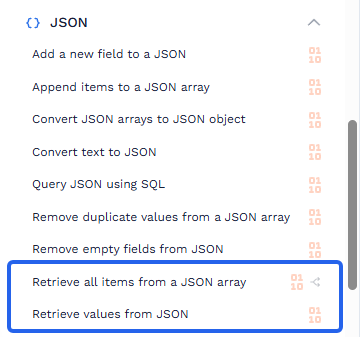
Extract values with JSONPath
Use Working with JSONPath with Custom Outputs when you have a JSON object (or a single item) and need named values for later steps.
- Run the Wrk Action that produces the JSON, usually a previous API response in the Data Library.
- Expand the result and define a Custom Output with the source output and JSONPath expression for the field you need.
- Use the named Custom Output as a Data Library item in later steps.
Those Custom Outputs become Data Library items you can bind into downstream Wrk Action inputs. Prefer clear names such as customer_email or invoice_total so later configuration stays readable.
For details about generated paths, filters, array access, arithmetic, joins, and JSONPath NG extension functions, see Working with JSONPath. If you are maintaining an existing Wrkflow that uses the dedicated Retrieve values from JSON Wrk Action, its action-specific inputs and outcomes remain documented in the reference page.
Retrieve all items from a JSON array
Use Retrieve all items from a JSON array when the payload is an array and you want every item processed by the steps that follow.
This Wrk Action divides on the array. Downstream Wrk Actions run once per item, in parallel. That is similar to multi-threading: faster execution when items are independent. Because of that:
- Items cannot share state or talk to each other while they run
- Items are not processed in a guaranteed order
For more on how divides work, see Divides.
You can also define Custom Outputs against the output for each divided item. For Text (short) and Text (long) fields, use JSONPath to select top-level or nested values from that item.
Nested fields inside array items
After the array is divided, define Custom Outputs on the Wrk Action that processes each item. Select the output containing the current item and use a nested JSONPath such as $.contact.email to expose the value downstream.
If extraction should be isolated into a separate step, pair the two Wrk Actions:
- Retrieve all items from a JSON array to divide on the array. 2. Use Custom Outputs with JSONPath to pull nested paths into named Data Library items.
Both patterns let downstream Wrk Actions work with named values instead of the full JSON object.
Filter, aggregate, or order before you process
If the array needs aggregation, filtering, or ordering before you divide or extract fields, use Query JSON using SQL first. Run your SQL against the JSON, then pass the result into Retrieve all items from a JSON array or use Custom Outputs with JSONPath as needed.
Which Wrk Action to use
| Goal | Wrk Action |
|---|---|
| Extract one or more fields (including nested paths) from an existing JSON output | Working with JSONPath and Custom Outputs |
| Process every item in a JSON array in parallel | Retrieve all items from a JSON array |
| Nested fields on each array item | Divide with Retrieve all items from a JSON array, then use Custom Outputs with JSONPath |
| Filter, aggregate, or reorder JSON before processing | Query JSON using SQL |
| Extract or alias values from an existing Wrk Action output | Custom Outputs |
Video overview
This video covers:
- Using JSON Path to retrieve values from JSON
- Using SQL to transform and aggregate JSON
Related resources
- Custom Outputs: name extracted values for the Data Library
- Working with JSONPath: query, filter, transform, and combine JSON values
- Data Library Items: bind those values into later Wrk Actions
- Retrieve values from JSON: action-specific inputs, outputs, and outcomes
- Retrieve all items from a JSON array: divide a JSON array for parallel processing
- Query JSON using SQL: filter, aggregate, and order JSON with SQLite syntax
- Divides: how parallel item processing works
- Data Manipulation: browse the JSON category and related Wrk Actions
- JSON array loops: key settings: extract fields while looping a JSON array
- Configuring Long Text Fields: insert Data Library items into long text inputs