Wrk Action Outcomes
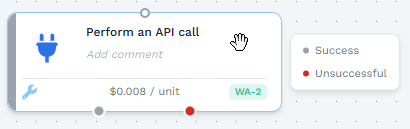
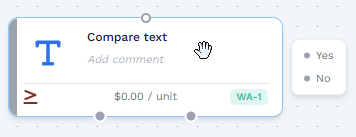
When you design a Wrkflow in the Wrkflow Designer, each Wrk Action exits with an outcome at runtime. Hover a Wrk Action on the canvas to see its available outcomes on the right side of the action card.
What Wrk Action outcomes are
Wrk Action outcomes let you route execution to different downstream Wrk Actions. The outcome names you can route vary by Wrk Action, but the behavior is consistent:
- Positive outcomes (gray circle) represent an expected or successful path for the step. Examples: Success, Yes, No
- Negative outcomes (red circle) represent an outcome you typically do not want to follow the happy path. If the outcome of a Wrk Action is negative that Wrk Action execution will cost 0 credits. Examples: No result, Unsuccessful
How to read the outcome list on the canvas
The outcome list order matches the outgoing connection points on the card:
- The top item in the list corresponds to the bottom-left connection point.
- The order moves left-to-right across the card toward the bottom-right connection point.
Branch execution by outcome
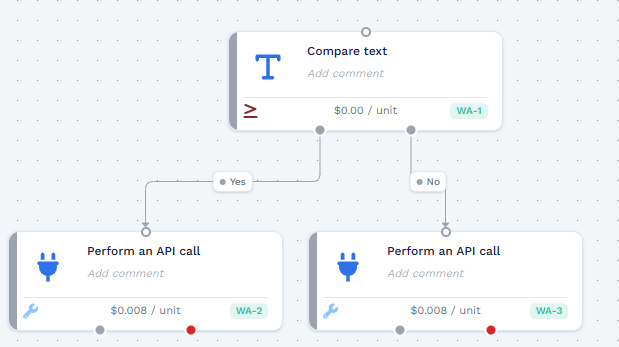
Use outcome connections to route your Wrkflow into different steps based on what the Wrk Action produces during a Launch.
Related resources
- Launch execution: Outcome Branching
- Wrk Action Testing: verify outputs before you connect branching logic
- Data Library Items: bind outputs into inputs for the next steps
- Monitor Launches: Outcomes
- Launch Console guidelines and best practices