API Keys
Open API Keys from the platform sidebar (key icon) to generate credentials and launch Wrkflows programmatically from your own applications or scripts.

The Wrk API authenticates with an account-level API key. Use it when you control the calling code: a backend service, an internal tool, or a script you run yourself. If you want a third-party application to start a Wrkflow when an event occurs, use a webhook trigger instead. Webhooks give each Wrkflow its own URL and do not require sharing your account API key with external systems.
For how API launch fits alongside other trigger types, see Triggers and Core concepts: Trigger.
Generate or refresh your API key
Your API key authenticates every request to the Wrk Launch API and Premium API. On the API Keys page, select Generate Key to create your first key. After a key exists, use Regenerate Key to invalidate the previous key and issue a new one. Regenerate when a key may have been exposed or when you want to rotate credentials as part of your security practices.
Only the most recently generated key is valid at a time. After you regenerate, requests that use an older key fail until you update the caller with the new value. Store the key securely and never commit it to source control or share it publicly.
The API Keys screen
The page groups your credentials, the launch endpoint, and a quick-start example in one place.
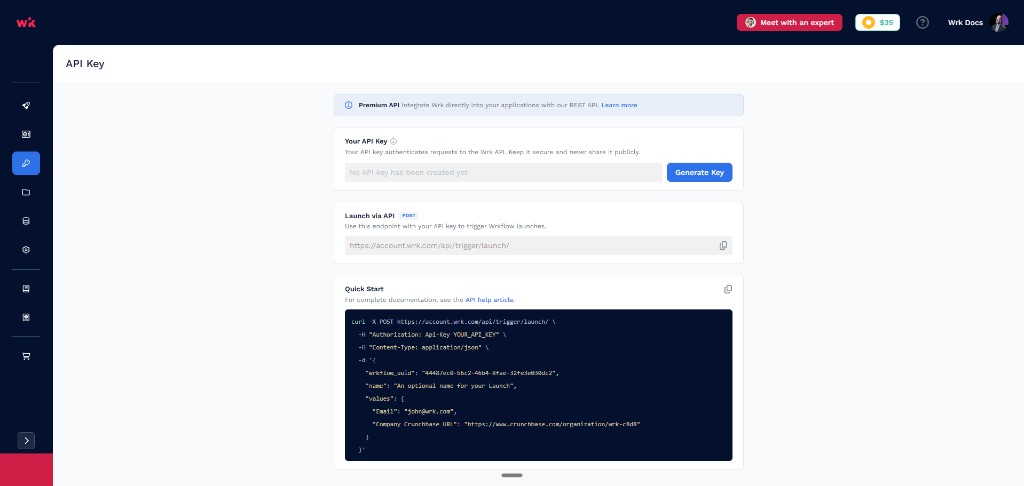
| UI element | What it tells you |
|---|---|
| Premium API banner | Points to the Wrk Premium API for deeper platform integration beyond launching Launches. Select Learn more for access and documentation. |
| Your API Key | Shows whether a key exists and lets you Generate Key or Regenerate Key. Use the visibility control to reveal the key when you need to copy it. |
| Launch via API | The POST endpoint (https://account.wrk.com/api/trigger/launch/) for starting a Launch. Use the copy control to paste it into your client or script. |
| Quick Start | A sample curl request with the required headers, wrkflow_uuid, optional launch name, and values for Wrkflow inputs. Links to the API help article for full parameter details. |
The sample body uses wrkflow_uuid to identify which Wrkflow to run and a values object for launch inputs (for example, an email address or URL field). Find the UUID on the Wrkflows screen under API Launch: UUID, or see Wrk Basic API: Launch a Wrkflow for the complete request format.
API vs webhook for integrations
| Use case | Recommended approach |
|---|---|
| Your application or script calls Wrk directly | API key and the Launch API endpoint on this page |
| An external product sends an event when something happens | Webhook trigger on the Wrkflow (per-Wrkflow URL, no account key shared) |
| Build or manage Wrkflows without the UI | Premium API (requires elevated access; see banner on this page) |