Launches
When you select a Wrkflow in Wrkflow Automation, the Launches view lists every Launch of that Wrkflow.
A Launch is a single execution of a Wrkflow. In practice:
- Wrkflow vs Launch: the Wrkflow is the design; each Launch is one time that design runs from trigger to completion
- Independent Launches: every Launch has its own inputs, progress, status, and history
- Separate tracking: launching the same Wrkflow ten times creates ten Launches, each tracked on its own
- Why it matters: compare outcomes across Launches, monitor production, and troubleshoot one execution without affecting others
For the glossary definition, see Launch in the Glossary.
How Launches start
A Launch begins when a Trigger fires: manual launch from the UI, email, schedule, webhook, or API. The Launch type column on the Launches screen shows how that Launch started.
See Triggers for each Launch method and when to use it.
The Launches screen
The header shows the Wrkflow name, ID, and UUID. Use Launch Control to start a new Launch. Search launches filters the table by name when you have many Launches to review.
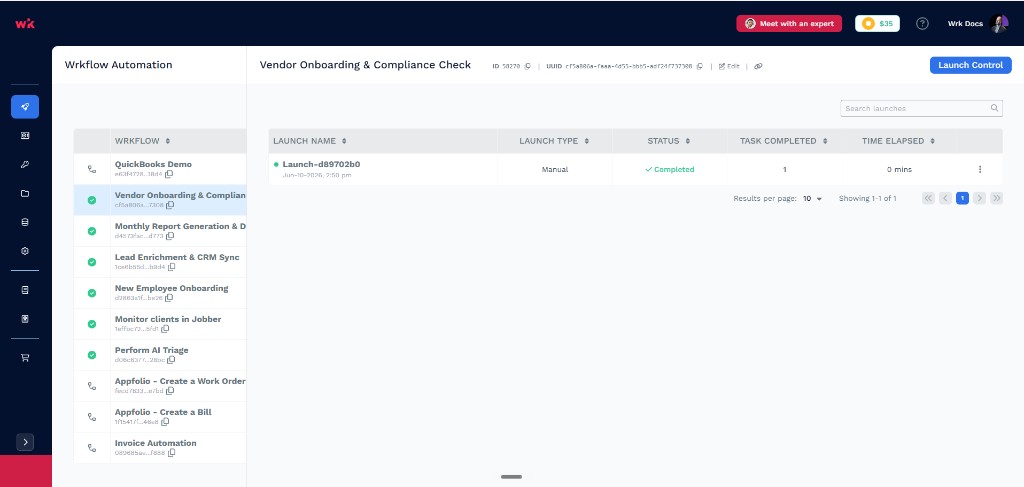
Each Launch records its own metadata and Launch state. The table below maps what you see on this screen to what each Launch tracks.
| UI element | What it tells you |
|---|---|
| Launch name | Human-readable label for this Launch (auto-generated by default); click to rename inline |
| Launch type | How the Launch was started (Manual, Schedule, Email, and so on) |
| Status | Where the Launch is in its lifecycle (for example, Running, Completed, Paused) |
| Tasks completed | How many Wrk Action steps have finished in this Launch |
| Time elapsed | How long the Launch has been running or took to complete |
| Cost | Credits consumed by this Launch. See How Account Credits work |
| Launch Console | Messages, questions, and progress surfaced during the Launch |
| Debug Console | Per-Wrk Action inputs, outputs, and errors when debugging is enabled |
| Actions (row menu) | Pause, open Launch Console or Debug Console, and other launch-level Wrk Actions |
| Search launches | Filter Launch history by name |
| Launch Control | Start a new Launch for this Wrkflow |
Launch name, Launch type, Status, Tasks completed, and Time elapsed appear as columns in the table. Cost, Launch Console, and Debug Console are available when you open a Launch or use the row Actions menu. See Launch Console and Debug Console.
Rename a Launch
Give Launches meaningful names so your team can tell them apart in the dashboard and in reports.
Rename from the dashboard
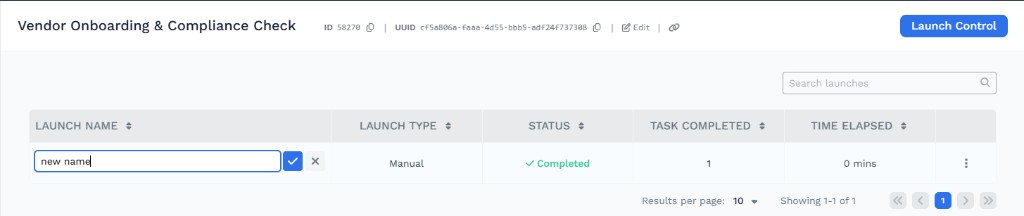
Click a Launch name in the table to edit it inline. Type the new name, then confirm with the checkmark or cancel with X.
Rename from a Wrkflow
Add the Rename launch Wrk Action to a Wrkflow when you want the launch name set automatically during a Launch (for example, from customer ID or file name). Configure New launch name with a fixed value or Data Library variables.
For naming guidance at launch time, see What is a Launch Name?.